
View your exact rupee balance, initiate UPI deposits via GPay, PhonePe or Paytm, and request withdrawals (minimum ₹100) — all without leaving your dashboard.
Colour Prediction, Raxiwin Lottery K3 & 5D, Wingo, Aviator, Rummy and Slots — all live the moment you sign in. One account, one wallet, every game.
Welcome bonus, daily login rewards, referral credits, gift code redemptions and cashback offers — all visible and claimable from Promotions inside your dashboard.
Take a break from Raxiwin for 24 hours, 48 hours, 7 days, or 30 days without permanently closing your account. During a cool-off, your account is inaccessible for gaming and deposits, marketing communications are suspended, and your wallet balance is preserved. The cool-off period cannot be cancelled once activated — this protection is intentional.
Complete history of every game round, deposit, withdrawal, and bonus — all timestamped and accessible from your account any time after signing in.
Start a game session on your phone, check earnings on a tablet, manage KYC on desktop — all through the same login with instant data sync across every device.
If you have forgotten your password, are on a shared device, or simply prefer not to type credentials, Raxiwin Login with OTP is the fastest alternative. This sends a fresh 6-digit one-time code to your registered Indian mobile number. The code expires after 5 minutes and can only be used once — giving you a clean, secure login every time without needing to remember your password.
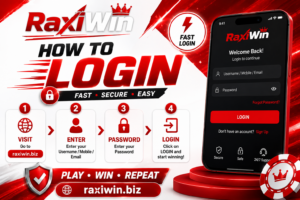
How to Login to Raxiwin Using OTP — Step by Step
- Open raxiwin.biz/raxiwin-login or the Raxiwin app and tap the Login button
- Look for the Login with OTP option on the sign-in form and tap it to switch from password mode
- Enter your registered 10-digit Indian mobile number in the field
- Tap Send OTP — a 6-digit code arrives via SMS within 10 to 30 seconds under normal network conditions
- Open your SMS inbox and note the code — it is valid for 5 minutes only. Never share this code with anyone
- Enter the 6 digits exactly as received — no spaces, no dashes
- Tap Verify — you are directed instantly to your Raxiwin dashboard
OTP Not Arriving? Try These Steps
- Check both your main SMS inbox and the spam or promotional SMS folder — some Android phones sort OTPs to a separate tab
- Confirm you entered your 10-digit mobile number correctly — a single wrong digit means the OTP goes to a different number
- Make sure you have mobile signal — switch from WiFi to mobile data (or the other way around) if signal is weak
- Wait for the full countdown timer on screen to reach zero before tapping Resend OTP — requesting too fast causes delays
- If the OTP still does not arrive after 3 attempts, contact Raxiwin support via live chat — our team resolves this within minutes, 24/7
Most common cause of failed logins. Retype your mobile number digit by digit. Check Caps Lock is off before entering your password. On Android, disable autocorrect in keyboard settings. If you are unsure of your password, switch to OTP login immediately and reset your password in the background.
After 5+ failed login attempts in quick succession, Raxiwin places a short automatic security hold on the account. Wait 15 to 30 minutes — the hold clears on its own. Clear your browser cache and try again in an incognito/private browsing window. If the lock persists beyond 1 hour, contact Raxiwin support.
Check your internet connection — try loading another website first. Switch between WiFi and mobile data. Clear browser cache: Settings → Privacy → Clear Browsing Data. Update your browser to the latest version. Try loading raxiwin.biz in an incognito window or a different browser entirely to eliminate cached data as the cause.
Check for available app updates and install the latest version from the official Raxiwin APK Download page. Clear app cache on Android: Settings → Apps → Raxiwin → Storage → Clear Cache. Force stop the app and reopen. Uninstalling and reinstalling is safe — your account, wallet and history are stored on the server and never affected by reinstallation.
Tap Forgot Password on the Raxiwin Login page. Enter your registered mobile number. Enter the OTP you receive via SMS. Create a strong new password (10+ characters, mix of letters, numbers and symbols). Tap Save — your new password is active immediately. Use it for your next Raxiwin Login.
Raxiwin Login requires a stable internet connection to complete the authentication check. On slow 2G or heavily congested WiFi, the login verification step can time out. Switch to 4G mobile data for login if your home WiFi is slow. Once logged in, the app handles weaker connections well for gameplay.